2. Quickstart
In this quickstart, we'll show how to use compile_dataset to create a DecompiledCodeDataset from a sample C repository.
Prerequisites
Before getting started, make sure you have the following installed:
- Python 3.8+
- gcc (for compiling C binaries)
- make (to build the example repository)
- Ghidra (to decompile the built binaries)
Step 1: Download and decompress the example repository
Download the provided example C repository, then decompress it.
Step 2: Create the dataset
Use compile_dataset to build the repository, extract functions from the source code and binaries, and organize them into a structured dataset:
import codablellm

dataset = codablellm.compile_dataset(
    'path/to/demo-c-repo',              # Path to the repository
    [
        'path/to/demo-c-repo/main_app',
        'path/to/demo-c-repo/tool',
    ],                                  # Binaries that will be built and decompiled
    'make',                             # Command/script path used to build the repository
)
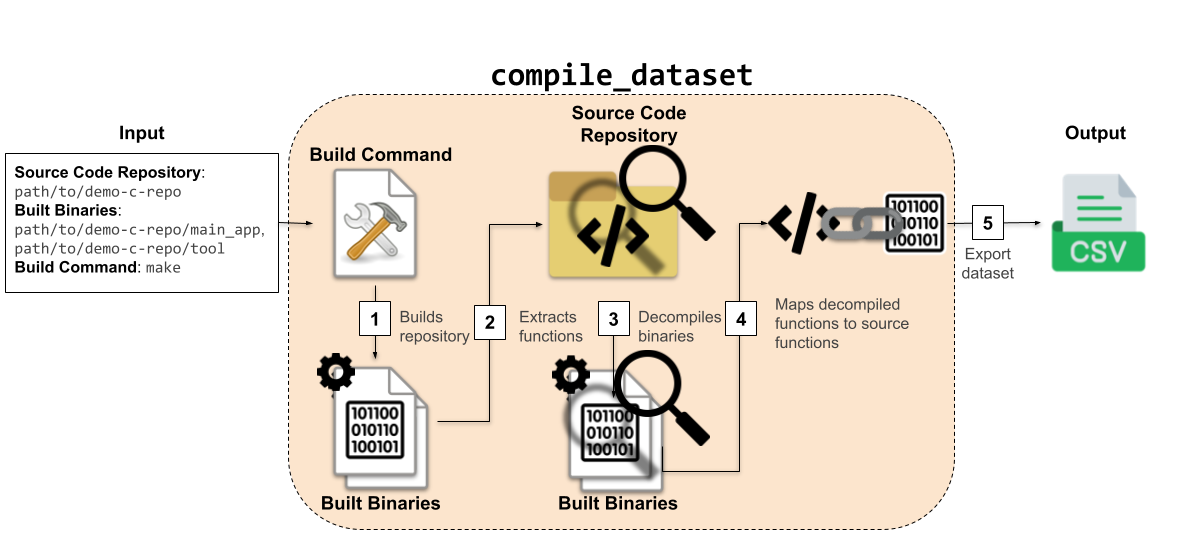
When compile_dataset is called, codablellm first executes the build command (make in this case) to build the binaries of the repository (path/to/demo-c-repo/main_app and path/to/demo-c-repo/tool). Then, it extracts functions from both the source code and the built binaries (using Ghidra to decompile the binaries). These functions are compared and mapped, creating a DecompiledCodeDataset. This dataset allows you to see decompiled functions alongside their potential corresponding source code functions, offering a bridge between low-level and high-level representations.
Step 3: Export the dataset to a CSV
Finally, export your dataset into a CSV file. For more export formats, see Dataset.save_as:
Visual Overview
Final note
This quickstart provides a minimal working example of how codablellm can create datasets from a simple C project. In the following sections, we'll dive deeper into:
- How to generate source code datasets
- How to generate decompiled code datasets from already compiled binaries
- How to manage and customize source code function extraction
- How to control and customize build processes
- How to configure and manage decompilers